Maximum video length MB WhatsApp 2026 based on internet speed: fast connections allow up to 100MB at 720p, while slower connections are restricted to 64MB at 480p.
But as smartphone cameras get better, even a basic HD video might overcome this limit. This does not mean you cannot share more than 100MB. Below are several ways I use to send large files that might also work for you.
How to send a video larger than 500MB?
Method 1: Send 500 MB Video as a Document
Many users might not realize that although the maximum video length on WhatsApp is 100MB, it can send files up to 2GB. You can get around video limits by sending your video as a file instead of sharing it directly.
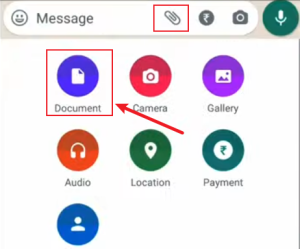
On Android:
- Open the WhatsApp conversation where you want to send the video
- Tap the paperclip icon (attachment button) next to the text field
- Select “Document” from the menu
- Browse to your video file and select it
- Tap “Send”
On iPhone (iOS):
- Open the WhatsApp conversation
- Tap the “+” button (bottom left)
- Select “Document”
- Tap “Browse” to open the Files app
- Navigate to your video file and select it
- Tap “Send
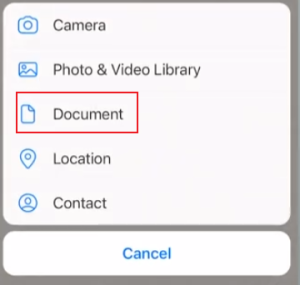
On WhatsApp Web/Desktop:
- Open the chat in WhatsApp Web
- Click the paperclip icon
- Select “Document”
- Choose your video file from your computer
- Click “Send”
This method keeps the original quality, works on all devices, and doesn’t require any extra apps.
This method doesn’t allow video previews, so you can only see the title. Additionally, you must download the file to watch the video since you cannot view it directly.
Method 2: Compress the 500 MB Video Without Destroying Quality
If the file is just slightly over what works reliably, compression can help.
Use apps like CapCut, HandBrake, VLC, or video compressors to make your files smaller.
Use H.265 (HEVC): H.265 often gives smaller files than H.264.
Lower Bitrate: Reduce bitrate while keeping resolution.
Frame Rate: 30 fps, 60 fps will increase the video file size.
Method 3: Cloud Storage Link Sharing
For videos larger than 2GB or when you want recipients to be able to stream rather than download, cloud storage services offer an excellent solution.
- Upload to Cloud Storage: You can use Google Drive, Dropbox, OneDrive, or iCloud. Upload the video you wish to send.
- Copy Share Link: Click a file to create a share link. The exact steps depend on the app you are using.
- Paste into WhatsApp.
- Send.
The recipient can view the video you sent simply by opening the link—no download required.
However, if you don’t have enough cloud storage, you won’t be able to upload videos to the cloud.
Method 4: Use MB WhatsApp 2026 Features
For users willing to venture beyond official apps, MB WhatsApp MODs offer significantly increased file size limits. These are modified versions of WhatsApp created by third-party developers.
Link MB WhatsApp mod versions include:
- Larger media size allowances
- Reduced compression
- Extended document transfers
- Higher image/video quality options
In the MB WhatsApp app, you can directly send original videos that exceed the official size limits. When sending HD images and videos, you can also preserve the original quality.
Users can send files directly in their original format, skipping the need for uploads or extra steps.
Installation Process for MB WhatsApp
- Download the APK: get download links from reliable websites such as mbwahpp.com.
- Enable Unknown Sources: In Android settings > Security
- Install the MB WhatsApp APK: Open the downloaded file and follow prompts
- Verify your number: Similar to the official WhatsApp setup
- Configure settings: Adjust file size limits and other preferences
Method 5: Other Methods (Not Recommended)
There are two other methods—converting the video into a ZIP archive or splitting the video—but I do not recommend them.
Convert Video Into a ZIP File
Place the video inside a ZIP archive. To watch these videos, the person receiving them must use a separate app to unzip the file first. For the recipient, this is not particularly convenient.
Video Splitting
One way to handle a large video file, like a 500MB one, is to cut it into smaller clips. This requires extra editing software, which might be difficult for people without experience. Additionally, the viewer has to watch the video in separate parts rather than all at once.
I want to send videos quickly and directly so the recipient can watch them right away. These two methods don’t meet the requirements, so I am just mentioning them and do not recommend using them.
Maximum Video Length MB WhatsApp: What Is the Limit?
When you send a video through WhatsApp’s standard gallery attachment method, you’re limited to 16MB for most users. For context, a 16MB video typically translates to:
- Approximately 58 seconds of 1080p footage at 2000 kbps bitrate
- About 1 minute 36 seconds of 720p footage at 1200 kbps
- Roughly 2 minutes 22 seconds of 720p footage at 800 kbps
- Around 4 minutes 38 seconds of 480p footage at 400 kbps
WhatsApp automatically compresses any video you send through this method, often resulting in noticeable quality degradation.
Common Questions and Answers
Q: What’s the best cloud service for sharing large videos via WhatsApp?
A: Google Drive is often the best choice for most users because it offers 15GB of free storage, integrates well with Android devices, and provides reliable sharing links. For Apple users, iCloud offers seamless integration with iOS.
Q: Why won’t the video I sent play?
A: Check that your cloud video was uploaded correctly. For local files, ensure the format is supported for previews. Sometimes, the video file itself may be damaged and unable to play.
Q: Why does WhatsApp limit the size of video shares?
A: WhatsApp focuses on quick messaging rather than file sharing, so its features are simplified to make chatting as easy as possible.
Which one do I recommend most?
For users who frequently need to share long videos and high-definition footage, I highly recommend using MB WhatsApp. It allows you to send files that far exceed the official limits—simply and quickly.
If you only need to send a large video file on a one-time basis, you can use either direct file transfer or cloud-based transfer. Both methods will meet your needs.
Choosing the solution that best suits your specific needs is the absolute right choice.