Group chats are useful, but they can also be stressful if you don’t want to reply immediately. Perhaps you’re busy and want to read the messages first, or you simply don’t want other members to know you’ve opened the chat. In this case, you may look for ways to read WhatsApp messages without opening the conversation directly. This leads to a question that MB WhatsApp users often ask: How can I read MB WhatsApp group chats without others being able to see them?
The answer depends on your definition of “being seen by others”. Reading group messages, displaying online status, displaying a blue checkmark, and displaying typing status are all different concepts. MB WhatsApp also offers additional privacy options, giving users greater control over these states.
However, group chats differ from private conversations in some ways. We have discussed how to send a formal message on MB WhatsApp before. Understanding these differences can help you use MB WhatsApp more comfortably.

What Happens When You Open a Group Chat
When you open a WhatsApp group, the app will usually mark a message as read if it meets the criteria for a read receipt. Other members will then see that the message has been read.
In private chats, turning off read receipts may affect the blue checkmark that appears after a message has been read. Group chats follow different rules. Therefore, changing the read receipt settings in private chats will not always have the same effect in group chats.
This is the most important point you must understand before attempting to secretly read group chat messages.
Therefore, simply turning off the blue checkmark option does not mean you can read all group messages without leaving any trace.
Can MB WhatsApp Hide Your Read Status
One of the reasons people use MB WhatsApp is that it offers more privacy control options. Depending on the version, MB WhatsApp may provide settings to hide different activity statuses, such as online, typing, or read indicators, giving users more control over how their activity appears to others. For those who want to manage read status more closely, a read receipt app can also be useful for understanding how these privacy features work.
These options make it easier to control what others see.
However, there is an important difference between hiding general activity status and hiding read group message status.
Privacy options may hide your online status when you read group messages. This means that other members may not be able to see that you are currently online. However, this does not mean that group messages will remain unread.
In other words, these are separate functions:
- Online status: Shows whether you are currently using WhatsApp.
- Read status: Shows whether a message has been read.
- Typing status: Shows when you are typing a reply.
- Recording status: Shows when you are recording a voice message.
- Last seen: Shows when you were last active, depending on your settings.
Knowing the difference helps avoid confusion when using MB WhatsApp’s privacy menu.
Reading Messages From Notifications
If your primary goal is to read a few messages without opening the group, notifications might be a good option.
When you receive a group message, your phone may display some or all of the message in the notification panel. You can read parts of the content directly without entering the conversation.
This method is very useful if you only need to know what the group is discussing without triggering Android messages read receipts. For example, if someone sends a short message such as “The meeting has been rescheduled to 3 p.m.”, you can probably understand the message content directly from the notification.
The main limitation is that notifications do not always display the complete conversation. If multiple people send messages at the same time, your phone may merge them or only display a portion of the content.
In addition, notifications are not always able to display photos, videos, stickers, voice messages, and other media content in their entirety.
Therefore, the notification preview feature is better suited for reading short text messages rather than lengthy group discussions.
Does Airplane Mode Let You Read a Group Chat Secretly
Another method frequently discussed by WhatsApp users is airplane mode.
The basic principle is simple: after receiving a group message, disconnect your phone from the network, open the chat window, read the message, and then close the application before reconnecting to the network.
The principle behind this method is that when the phone is offline, the application cannot immediately send information to the server.
However, this is not a way to permanently hide reading activities. Once the network connection is restored, the application may synchronize the information that was previously waiting to be sent.
Therefore, Airplane Mode should be considered a temporary offline reading method rather than a dedicated privacy protection feature.
If you frequently need to check group messages but don’t reply, then using MB WhatsApp’s privacy settings might be more convenient than repeatedly using the offline method..
Can You Read a Group Chat Without Showing “Online”
This is a different issue from hiding the read status.
The MB WhatsApp may include an option that allows users to hide their online status. If this feature is available and enabled, others may not see the usual “Online” label when you are using the app, which also gives you similar control over your privacy as managing a message read receipt Android setting would.
This feature is very useful if you want to open a group and read the latest conversations, but don’t want others to know you’re currently online.
For example, you might receive dozens of messages during the day, but only have time to check them at night. Hiding your online status can prevent other members from mistakenly thinking you are chatting.
However, hiding your “Online” status does not necessarily mean hiding all other activities. Read receipts, input indicators, and other privacy signals can be configured individually.
What About Typing Indicators
Sometimes the biggest problem isn’t not reading the message, but accidentally showing that you’re preparing to reply.
In a busy group, you might start typing something, then delete it, and finally decide not to send it. If the input status is displayed, other members may notice that you are about to reply.
MB WhatsApp may offer an option to hide the input status. Once enabled, you’ll have more time to think before you reply.
This is especially useful in large groups where the conversation moves at a fast pace. You can read multiple messages, think about what you want to say, and then reply without your typing status being displayed immediately.
To reiterate, input privacy and reading privacy are different settings and should not be considered the same function.
What If You Only Want to Read Old Messages
Another situation to consider is that you might prefer to view previous group messages rather than read newly received ones.
For example, someone might ask, “What did we decide last week?” Instead of asking the group again, scroll through the chat history to find previous discussions.
When you open a group, the app may update the message status based on what you are viewing. Therefore, the fact that a message is old does not mean that it will not be tracked and read.
If you value privacy, it’s best to check MB WhatsApp’s privacy settings options before opening a conversation.
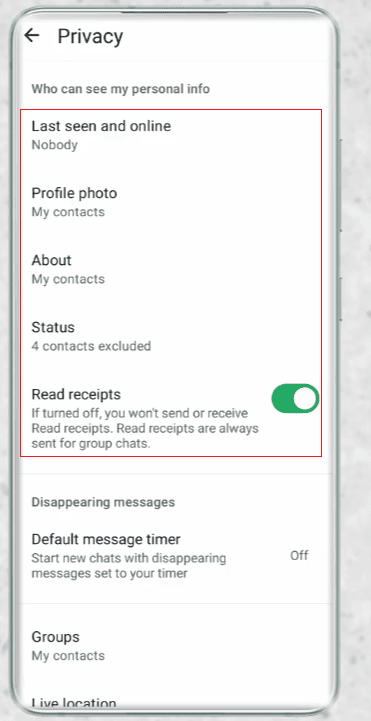
How to Check MB WhatsApp Privacy Settings
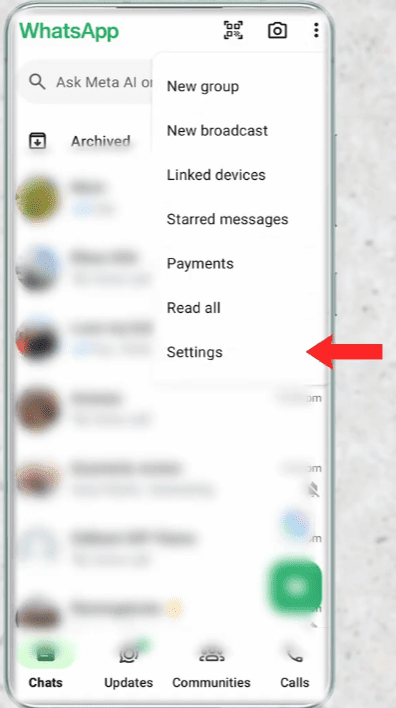
The specific names and locations of the settings may vary depending on the version of MB WhatsApp, but the overall steps are generally similar.
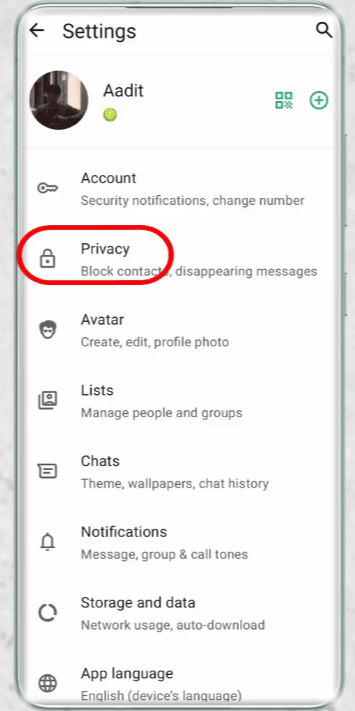
First, open MB WhatsApp, then find the privacy settings option in the main settings or MB WhatsApp’s additional settings menu.
Then look for options related to:
- Online status
- Last seen
- Read receipts
- Typing status
- Recording status
- Status viewing
- Other privacy controls
Please read the instructions before enabling or disabling any option. Some settings may apply to all conversations, while others may have more specific functions.
After changing the settings, it’s best to do a quick test in another conversation or group. This helps you accurately understand what others can see.
Why Group Chats Are Different
The reason this topic is so confusing is mainly that WhatsApp handles group chats and one-on-one chats differently.
Private conversations involve only two people, making read receipts and activity signals easier to understand. A group can have multiple participants, and each person sends a message at a different time.
This is why privacy settings that work in private chats may not work in group chats.
Therefore, it’s best to check your specific privacy settings in your WhatsApp MB version rather than assuming that one setting controls everything.
Conclusions
You can reduce some visible activity traces by setting privacy options, such as hiding online status or input indicators.
The notification preview feature also allows you to read portions of messages without opening the group, which is particularly useful when using an Android messaging app with read receipt features turned on. Other offline methods may work temporarily, but they should not be confused with permanent privacy controls.
The most important thing is to understand the actual function of each setting. Being online, reading messages, replying, and viewing media are different actions.
If you frequently read group chat messages but don’t want to reply immediately, please take a few minutes to review the privacy settings in the WhatsApp MB version. Once you have a look at the available options, you can choose the settings that best suit your group chat style.