Superscript is a small but useful formatting style that can make your messages look clearer and more organized. It is typically used for numbers, formulas, dates, or short notes, and in MB WhatsApp it can be created in several simple ways without complicated tools; when using whatsapp superscript in MB WhatsApp, you can quickly format text to highlight small details and make your messages easier to read and more professional.
This guide will walk you step-by-step through practical methods to help you easily use superscript in chat.
What is Superscript
Superscript is a text style in which characters are written slightly above the normal text line and are usually smaller than ordinary letters or numbers, and it is often used to display additional information without interfering with the reading of the main clause, while tools like a superscript keyboard make it easier for users to quickly insert these elevated characters when typing in digital documents or messages.
For example:
- Normal text: x2
- Superscript: x²
The position of the “2” is higher than the letter “x”, making it more visually prominent. This subtle change in position helps to distinguish the main content from the supporting details.
Superscripts are commonly used in everyday writing, especially in mathematics, science, and short notes. In mathematics, it is used to represent powers and exponents, such as 3³ or 10⁴. In general writing, it may also appear in dates, such as 1st, 2nd, or 3rd, where the last letter is sometimes shown as a superscript.
In instant messaging apps like MB WhatsApp, superscripts are primarily used for text styling or to highlight certain parts in a concise and clear way. It helps make messages look more organized without adding extra text.
In summary, superscript is a small but useful formatting feature that can improve clarity and, in some cases, make text easier to read.
Method 1: Use Unicode Superscript Characters
In MB WhatsApp, the simplest and most common way to input superscript is to use Unicode superscript characters. These special text symbols already exist in the system, so no additional applications or complicated settings are required, and this approach is often considered one of the easiest tricks in WhatsApp text for formatting messages. Simply copy and paste it directly into the chat, and it will display correctly without needing any extra adjustments.
The reason why Unicode superscript works is that some letters, numbers and symbols have smaller “raised” versions built into the Unicode standard. For example, numbers like ¹ ² ³ or letters like ᵃ ᵇ ᶜ can be used instead of ordinary characters. Once pasted, they will appear naturally in your message and blend in with the rest of the text.
Steps:
- Open a Unicode superscript generator or symbol page in your browser
- Type your normal text, such as x2, 1st, or a2
- The tool will convert it into superscript form automatically
- Copy the converted result
- Paste it into your MB WhatsApp chat
A small limitation to know:
Not all letters have a perfect superscript version in Unicode. In some cases, only numbers and a few letters are available, so longer words may appear slightly unevenly. For this reason, it is best suited for short segments in messages, rather than complete sentences.
In conclusion, Unicode superscript is the quickest and most practical option for everyday MB WhatsApp chats.
Method 2: Copy Superscript from Notes or Websites
This is one of the simplest ways to use superscript in MB WhatsApp, especially suitable for users who don’t want to use tools or keyboard settings. It works by copying formatted text from elsewhere and then pasting it directly into the chat window.
How it works in practice
You don’t need to create the superscript text yourself; instead, you can use existing, correctly formatted content. This content can come from your phone’s notes app, instant messaging drafts, or websites that support special characters.
Steps in detail:
- Open your browser or notes app
- Search for the exact superscript word or number you need
- Copy the formatted version of the text
- Switch to MB WhatsApp
- Paste it directly into your message box
The formatting is usually preserved when you paste it, so the superscript stays visible in the chat.
Small limitation to keep in mind
Not all websites or note sources display superscripts in the same way. Some text may appear normal after copying, depending on its source. Therefore, it is best to test sample text before using it for important information.
Method 3: Use Keyboard Apps with Symbol Support
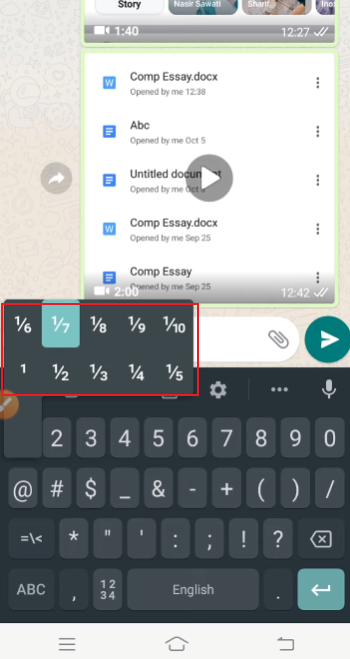
Some mobile phone keyboards make it easier to use special characters. Users can use these symbols directly while typing without relying on copy and paste tools, which will save a lot of time if you frequently use superscript in chat, a small detail that often comes up in WhatsApp tips.
How it works in practice
Most advanced keyboard applications come with an additional symbol panel or an extended character set. These elements are not always visible in the basic layout, but you can switch them to be visible as needed.
Steps:
- Install a keyboard app that supports extended symbols
- Go to your phone settings and set it as your active keyboard
- Open MB WhatsApp and start a chat
- Tap the symbol or “123” section on your keyboard
- Look for additional symbol pages
- Select superscript characters if available, or related letter/number variants
- Insert them directly into your message
Extra tip
Not all keyboards can clearly display the complete superscript character set. In some cases, you may only see a few characters, such as ¹ ² ³. If you encounter this situation, you can combine keyboard input with occasional copy and paste to complete your information editing more smoothly.
In summary, using a keyboard that supports symbols makes using superscripts more natural and faster, especially once you get used to it.
Method 4: Use Formatting Apps or Text Tools
In WhatsApp MB, the formatting app and text tools offer one of the most flexible ways to create superscript text. They are especially useful when you need more fine-grained control over the appearance of your messages, or when you want to quickly generate formatted text without having to manually search for symbols.
How these tools work
Most apps or websites of this type convert plain text to different Unicode character sets. As you type a message, the tool will replace ordinary characters with the corresponding superscript characters. Then, you can copy the converted result and paste it directly into MB WhatsApp.
Steps to use formatting tools
- Open a text formatting app or online generator
- Enter the text you want to convert
- Select the superscript style option from the list
- Preview the result to check readability
- Copy the formatted text
- Paste it into your MB WhatsApp chat
This process usually takes only a few seconds once you are familiar with it.
Small practical tip
Different tools may generate slightly different superscript styles. Some look more compact, while others have wider spacing. It’s best to try two or three tools and choose the one that best suits your messaging style.
In daily use, once you get used to a certain tool, this method becomes one of the quickest ways to add superscripts in WhatsApp MB without having to worry too much about formatting details.
Tips for Better Superscript Use in MB WhatsApp
Using superscripts in WhatsApp MB can make messages look more organized, but the key is to use them naturally and smoothly. Overuse or careless placement can actually make the text difficult to read. The purpose of using superscript is for clarity and ease of understanding, not for decoration.
1. Use Superscript for Small, Meaningful Details
Superscripts are best suited for highlighting short elements such as numbers, dates, or symbols. For example, “First Meeting” or “Version 2 Update” are concise, clear, and easy to navigate. If used in longer phrases, the information may become unbalanced, causing visual fatigue.
2. Keep a Clear Balance with Normal Text
Good information usually combines body text and superscript, rather than relying on just one style. The main text conveys the main meaning, while the superscript adds details. This balance helps readers understand your message easily and quickly.
3. Avoid Overloading a Single Message
Adding too many superscripts to a sentence reduces readability. Ideally, each sentence should only be used once or twice, and you should make sure it actually works. Applying styles to all content can actually make it lose its appeal.
4. Stay Consistent in Style
If you use superscript for a specific purpose, try to maintain consistency. For example, if you use superscripts to indicate numbering (1st, 2nd, 3rd), always use the same format and do not switch styles midway. Maintaining consistency can make your chat history look neater and more organized.
5. Test Before Sending Important Messages
Sometimes, superscript characters may display slightly differently on different devices or fonts. Before sending important information, please quickly check the display in the chat preview. This helps avoid uneven spacing or unclear symbols.
6. Use It to Improve Readability, Not Just Style
The purpose of superscripts is to help readers understand the text, not just for decoration. When used properly, it can guide readers to focus on small but important details such as rankings or versions, without distracting them from the main information.
When used properly, concise and standardized superscripts can make WhatsApp messages look cleaner, more organized, and easier to understand.
Final Thoughts
Once you know the method, entering superscript in WhatsApp MB is very simple. You can use Unicode symbols, copy and paste tricks, keyboard tools, or text converters. Each method is suitable for different needs.
With a little practice, you can quickly add superscripts to your everyday chats, making your messages look more organized and neat.